Before you continue

By using Vendro's website and services you agree to our Terms & Conditions, Privacy Policy, and Cookie Policy.

Integrated Modules - Interactive Process Diagrams

Every feature. Every flow.
Every business need.

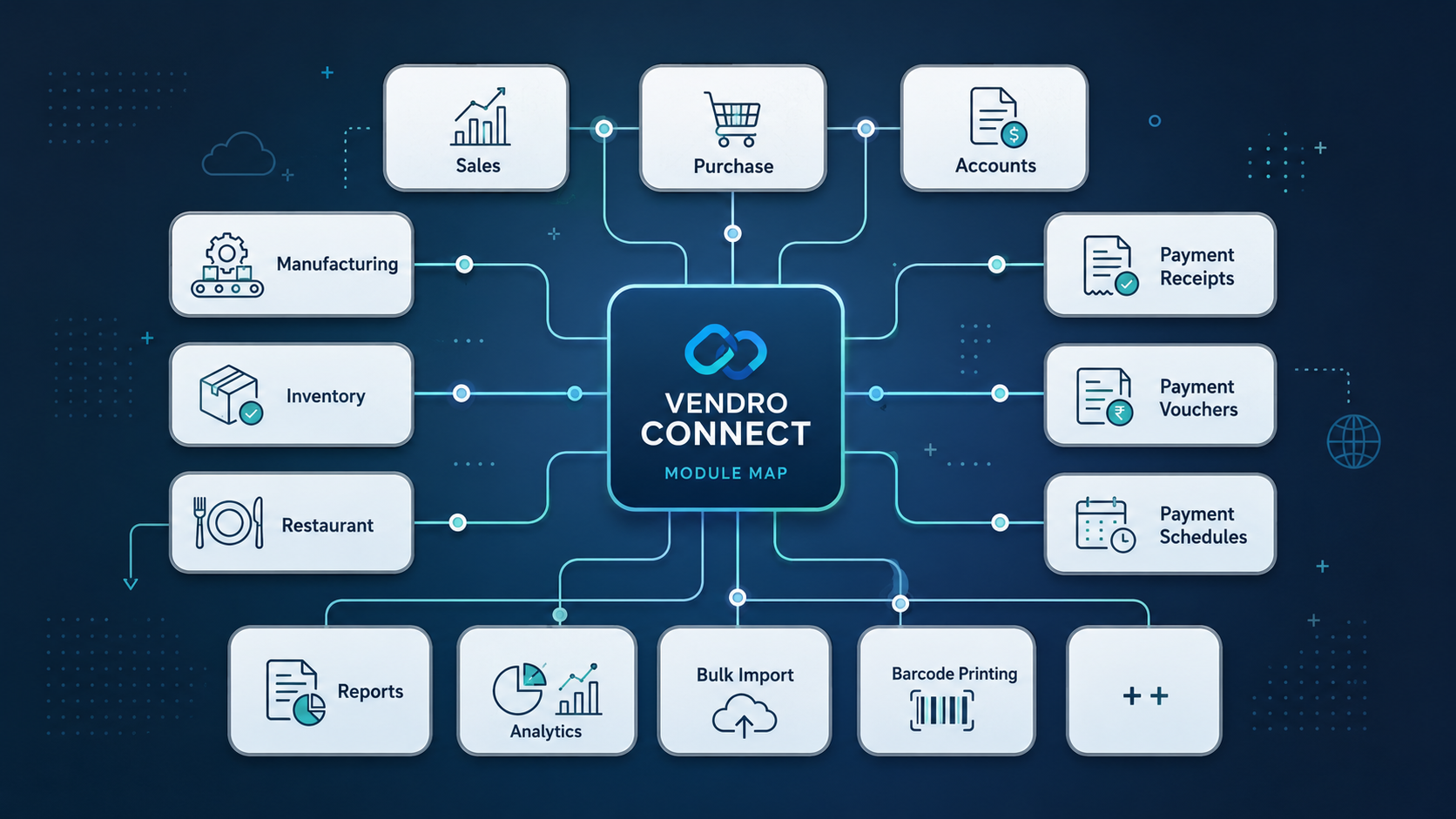
Deep-dive into Vendro modules - each with an interactive process diagram, step-by-step flow, feature references, business benefits, and UAT checklists. Click any step to explore detail.

Multiple modules. One unified platform.

Every plan includes the Sales/POS core. Industry modules activate as your operation scales.

Module 01 - Core

Secure Onboarding & Access Control

The secure foundation of every Vendro session. Multi-tenant login, branch selection, role-based menu access, and a personalized dashboard that puts the right alerts and shortcuts in front of every user from the moment they log in.

1
Secure LoginCredential validation, brute-force protection, and password reset flows.
2
Tenant & Branch ContextSelect company and active branch - all transactions filter to this context.
3
Role & Permission ValidationMenus, reports and actions shown only to authorized roles - no data leaks.
4
Dashboard & Alert LaunchPersonalized shortcuts, pending work, operational alerts, and support access.
5
User AdministrationCreate users, assign roles, manage profiles, and deactivate access instantly.
Multi-tenantBranch contextRole-based menusDashboard alertsSupport requestsQuick navigation
Module 02 - Sales/POS

Point-of-Sale, Invoicing & Billing Control

From counter checkout to field invoicing - every billing scenario handled. Multiple payment methods, customer credit enforcement, profit margin locks, loyalty redemption, draft orders, approval workflows, and sales team performance tracking all in one screen.

1
Customer & Salesman EntrySelect walk-in or existing customer, link salesman for performance tracking.
2
Item Selection & Stock CheckSearch by SKU, barcode scan, or category; real-time stock availability validated.
3
Pricing, Discounts & Margin GuardCustomer price list auto-applied; system blocks selling below minimum margin.
4
Multi-Method PaymentCash, card, credit account, split - all linked to cashier session with full audit trail.
5
Invoice, Loyalty & ReportsPrint/email invoice, award loyalty points, update stock and sales team reports.
Counter checkoutDraft ordersApproval workflowsSales returnsCredit limit checkMargin lockLoyalty programEmail invoice
Module 03 - Restaurant

Floor Management, KOT & Restaurant Operations

Manage your entire restaurant from one screen. Multi-floor table management with real-time status (Free, Occupied, Reserved, Bill Printed), kitchen order tickets (KOT) with queue tracking, delivery orders with rider assignment, and cashier session linkage.

1
Floor & Table SetupConfigure multiple floors, tables, seat counts, and status tracking.
2
Order Taking & KOTTake dine-in orders, send kitchen tickets, track queue to preparing to ready.
3
Reservation ManagementAccept bookings, assign tables in advance, and confirm guest arrival seamlessly.
4
Delivery & Rider BoardManage delivery orders, assign riders, and track dispatch from one board.
5
Billing & Table ClosureGenerate bill, apply discounts/loyalty, receive payment, close table, update inventory.
Multi-floor managementTable status boardKOT / kitchen screenDelayed KOT alertsReservationsDelivery boardRider assignmentCashier linkage
Module 04 - Manufacturing

BOM, Production Orders, QC & Batch Traceability

End-to-end production control - 6-stage workflow: Product & BOM Setup, Production Planning, Material Issue, Stage Processing, Quality Control, and Finished Goods & Traceability. Real-time counts for orders, WIP value, QC pending, and finished goods.

1
Product & BOM SetupDefine finished item, create BOM/recipe, set cost inputs, manage active BOMs.
2
Production PlanningCreate production orders, define quantity, schedule date - track open/delayed orders.
3
Material IssueReserve and issue raw materials, track material checks, pending issues, variance.
4
Stage ProcessingStart production, move through stages, capture in-progress counts and delayed stages.
5
Quality ControlInspect output, record pass/fail, send failures to rework/scrap - QC pending tracking.
6
Finished Goods & TraceabilityComplete job, create finished stock, assign batch/lot, update receipts and trace batches.
BOM managementProduction ordersMaterial issueStage trackingQC pass/failRework/scrapBatch traceabilityJob work/subcontracting
Module 05 - Inventory

Smart Stock Control Across Every Branch

Zero blind spots across all locations. Track every product in real time, automate purchase orders from low-stock alerts with lead time intelligence, transfer stock between branches with full audit trails, and monitor expiry dates for pharmaceutical and food businesses.

1
Product Master & Multi-PricingSKU, barcode, UOM, variants, and wholesale/distributor/retail price list setup.
2
Bulk Excel Import + Barcode PrintingImport thousands of products from Excel, auto-process purchase invoice, print barcodes.
3
Reorder Levels & Lead TimesSet minimum stock thresholds with lead times - auto-generate POs from low-stock alerts.
4
Inter-Branch TransfersDispatch from source, receive at destination - fully traceable movement between branches.
5
Expiry & Batch TrackingNear expiry reports, product expiry reports, batch expiry - essential for pharma/food.
Bulk import + barcodesInter-branch transferLow-stock PO generationLead time configExpiry reportingBatch trackingStock auditDamage control
Module 06 - Customers & Suppliers

Full Ledger Management for Every Relationship

Complete financial visibility across every business relationship. Customer credit limits enforced at POS, full transaction ledger history, supplier aging and reconciliation, multi-tier price list assignment by segment, and supplier portal access for collaborative purchasing.

1
Customer Master & CreditSet credit limits, payment terms, category, and customer pricing segment.
2
Multi-Tier Price List AssignmentAssign wholesale, distributor, or retail pricing - auto-applies at billing.
3
Supplier Ledger & PayablesFull supplier transaction history, payment aging, and reconciliation reports.
4
Customer Ledger & ReceivablesTrack all invoices, receipts, outstanding balances, and aging by customer.
5
Employee RecordsStaff assignment, department/role linkage, and module access configuration.
Credit limit enforcementCustomer ledgerSupplier ledgerMulti-tier pricingAging reportsSupplier portal
Module 07 - Purchase / Finance

Smart Purchasing, Payables & Auto-Scheduling

Complete purchasing lifecycle with automated intelligence. Purchase orders generated from low-stock alerts, full or partial receiving, auto-payment scheduling for rent and utilities, cashier session reconciliation, and full financial reporting keep your books always accurate.

1
Purchase Order ManagementCreate POs manually or auto-generate from low-stock; receive full or partial.
2
Auto-Payment SchedulingSchedule rent, utilities, and recurring commitments with advance reminders.
3
Supplier Payments & ReturnsRecord payments, post purchase returns, update payable balances with reasons.
4
Customer ReceiptsRecord receipts, link invoices, and update customer balance accurately.
5
Cash Session & Finance ReportsLink cashier sessions, reconcile cash and bank, review full finance reports.
Auto PO generationFull/partial receivingPurchase returnsAuto-payment scheduleSupplier paymentsCashier sessions
Module 08 - Reports & Analytics

14 KPIs, 7 Charts & Executive Business Intelligence

Executive Overview with 14 KPIs and 7 charts - Total Sales, Gross Profit, Gross Margin %, Net Receivable, Net Payable, Cash/Bank, Inventory Value, Low Stock, Slow Moving, Production In Progress, Pending Approvals, Today vs Yesterday, and 7-day comparison. Plus Sales, Inventory, Customer, Profitability, Purchase, Financial, Production, and Team Analytics.

1
Report Finder - 5 CategoriesOperations (5), Inventory & Products (13), Sales Analytics (4), Ledgers & Finance (14), People Performance (6).
2
Executive Overview Dashboard14 KPIs and 7 charts in one command view - owners and managers get the full picture instantly.
3
Inventory Reports - 13 ReportsInventory, product ledger, movement, sales analysis, reorder, expiry, near-expiry, minimum qty, fast-moving, stock prediction, top-selling, barcode printing.
4
Daily Sales Trend & Gross ProfitDate-level trend charts with invoice count, COGS via batch/weighted average/last receipt cost hierarchy.
14 KPIs7 chartsExecutive overviewSales analyticsInventory analyticsProfitability analyticsProduction analyticsTeam & targets
Module 09 - Setup & Security

Enterprise Configuration & Governance

Build your entire business structure once, govern it consistently forever. From multi-country franchise hierarchy to granular role permissions, currency setup, tax rules, and bulk product import - all controlled and auditable.

1
Company & Branch HierarchyDefine multi-country franchise structure, branches, and operating contexts.
2
Users, Roles & Menu PermissionsCreate granular roles - users see only what they're authorized for.
3
Multi-Currency & Tax ConfigurationConfigure exchange rates, tax rules, and regional financial defaults.
4
Bulk Import & TemplatesImport products, customers, stock from Excel; print barcodes in one workflow.
5
Security & AuditAudit trail, security logs, session management, and access control governance.
Multi-branch configMulti-currencyRoles & permissionsMenu access controlBulk Excel importTax rules
Module 10 - Customer Investment

Customer Financial Management & Investment Tracking

Manage complex customer financial relationships beyond simple credit. Track customer investment schemes, instalment plans, advance payments, and financial commitments with full ledger accuracy and automated payment tracking.

1
Investment Scheme SetupDefine customer investment plans, instalment schedules, and payment terms.
2
Payment TrackingTrack advance payments, instalment receipts, and outstanding commitments.
3
Ledger IntegrationAll investment activity posts to customer ledger for full financial transparency.
4
Investment ReportsReview customer investment status, maturity dates, and payment history.
Instalment plansAdvance paymentsLedger integrationInvestment reports
Module 11 - Field Sales Team

Mobile Sales Teams - Fully Connected & Tracked

Field representatives book orders remotely, log GPS-verified customer visits, schedule follow-ups, and report outcomes in real time. Managers get live visibility into team coverage, order pipeline, and customer engagement - no more manual end-of-day reports.

1
Remote Order BookingField reps place customer orders from their mobile - instantly visible in the system.
2
Customer Visit TrackingLog visits with GPS context, notes, and outcomes for every customer call.
3
Follow-up SchedulingSet follow-up reminders so no customer opportunity is missed or forgotten.
4
Manager Live DashboardReal-time team activity - coverage, orders booked, visits logged, performance KPIs.
Remote order bookingGPS visit trackingFollow-up schedulingManager dashboardTeam KPIs
Module 12 - Investors

Investor Management, Profit Distribution & Auto-Payment

Manage investor relationships with professional transparency. Track share ownership, automatically calculate profit distributions based on ownership stakes, generate investor-specific reports, and automate recurring payment schedules so you never miss a commitment.

1
Investor & Share SetupRegister investors, define share percentages, link to business entities.
2
Profit DistributionAuto-calculate shares based on ownership stakes; post distribution entries.
3
Auto-Payment SchedulingSchedule payouts with advance notification - never miss a stakeholder commitment.
4
Investor ReportsDetailed profit reports by investor, period, and business unit for full transparency.
Share trackingAuto profit distributionAuto-payment schedulePayment remindersInvestor reports
Module 13 - Command Center

System Intelligence, Universal Search & Integrations

Your operations nerve center. Ctrl+K universal search across the entire system, webhook and API integration monitoring, help content discovery, navigation shortcuts, and automation triggers - making every user measurably faster at their daily work.

1
Ctrl+K Universal SearchSearch customers, products, invoices, features, and help from anywhere in the system.
2
Webhook & Integration MonitoringTrack API events, automation triggers, and integration status in real time.
3
Help & Guidance DiscoveryContext-aware help surfaces when users need it - reducing support requests.
4
Navigation ShortcutsPersonalized shortcuts reduce clicks; pin frequently used workflows.
Ctrl+K searchWebhook monitoringAPI integrationsHelp discoveryNavigation shortcuts

Multiple modules. One workspace.
Start free today.

Core module promotional access is managed from CRM. No credit card required when a grace workspace is enabled.